Configuring BGP
While OSPF is used to provide IP connectivity within an AS, BGP is used to advertise prefixes between different ASes. Unlike OSPF, BGP routers will not automatically establish sessions. Each session needs to be configured individually. The following commands show you how to: start a BGP process and establish two BGP sessions with neighboring routers. The integer following router bgp indicates your AS-number. Here, the local AS-number is 2:
router# conf t
router(config)# router bgp 2
router(config-router)# neighbor 150.0.0.1 remote-as 15
router(config-router)# neighbor 2.0.0.2 remote-as 2
By default, whenever the remote-as is different from the local number (here 2), the BGP session is configured as an external one (i.e., an eBGP session is established). In contrast, when the remote-as is equivalent to the local one, the BGP session is configured as an internal one (iBGP). Here, the first session is an eBGP session, established with a router in another AS 150.0.0.1, while the second one is an internal session, established with a router within your AS 2.0.0.2.
❗️ Important for eBGP sessions with FRR v.7.5 (used in this year’s project): When setting up an eBGP session, there is an implicit route-map which denies everything that is automatically configured on the session. Route-maps enable you to express input and output filters on the routes sent and received by a BGP session. We explain them in detail in the next section. To start advertising and receiving prefixes on an eBGP session, you need to override this implicit route-map by explicitly defining a route-map which permits all (or only some) prefixes, and apply it on the corresponding eBGP session. For instance, to advertise and receive all the prefixes, you need to define a route-map that permits everything:
router# conf t
router(config)# route-map ACCEPT_ALL permit 10
router(config-route-map)#
Then, you need to apply this route-map on the BGP session, for both the advertised and received prefixes:
router# conf t
router(config)# router bgp 2
router(config-router)# neighbor 150.0.0.1 route-map ACCEPT_ALL in
router(config-router)# neighbor 150.0.0.1 route-map ACCEPT_ALL out
Now, you should see that our two BGP sessions are up and allow advertising/receiving prefixes. You can check the state of your BGP sessions using the command show ip bgp summary:
router# show ip bgp summary
Neighbor        V    AS MsgRcvd MsgSent   TblVer  InQ OutQ Up/Down  State/PfxRcd
2.0.0.2        4      2       3       6        0    0    0 00:01:16        0
150.0.0.1      4     15    2009    1979        0    0    0 01:31:42        1
To advertise a prefix on a BGP session, you can just use the following command:
router# conf t
router(config)# router bgp 2
router(config-router)# network 10.104.0.0/24
As soon as you do that, your neighbor 150.0.0.1 receives this advertisement and knows that it can forward to you all the packets with a destination IP in the subnet 10.104.0.0/24. Note that when you advertise a prefix, it generally means you know how to reach this prefix, otherwise you will drop the packets, and your neighbor will not be very happy.
⚠️ With some routers (and that is the case for our FRR routers) BGP will not announce a route for a prefix that it does not know how to reach. If you want to announce your /8 prefix, you must then configure a default route to Null, such as the following:
ip route 10.104.0.0/24 Null0
Perhaps one of your BGP neighbor advertises you prefixes as well, let’s check that:
router# sh ip route bgp
B>* 2.101.0.0/24 [20/0] via 2.0.0.2, interface_used, 00:03:17
In this case, we can see that neighbor 2.0.0.2 has advertised one prefix: 2.101.0.0/24. The B at the beginning of the line indicates that the router has learned this prefix from BGP.
BGP update-source for iBGP sessions
By default, when a router establishes an iBGP session with a peer, it uses the IP address of the interface closest to the iBGP peer as source address. This is fine as long as this interface is up. If this interface goes down but the actual router is still running, the iBGP connection will tear down even though the router may be reachable over a different path/interface. In practice, operators therefore often use so called “loopback” interfaces as source of the iBGP connections. Loopback interfaces are virtual interfaces with an IP address which uniquely identifies the router in your network. For example, if you are group 7 and you want to configure an iBGP session from TOKY to AUCK, you could use the following commands (on TOKY):
router# conf t
router(config)# router bgp 7
router(config-router)# neighbor 7.158.0.1 remote-as 7
router(config-router)# neighbor 7.158.0.1 update-source lo
7.158.0.1 is the loopback interface IP of AUCK. With update-source lo you make sure that the TOKY router is using its loopback interface address as source address.
BGP next-hop-self
The figure below illustrates a possible pitfall when eBGP announcements are distributed over iBGP sessions. If router R1 is advertising its prefix 11.22.33.0/24 towards R2 (over the eBGP session), the next-hop of the advertisement is the IP of the outgoing interface of R1 (10.0.0.2). Router R2 is then distributing this advertisement to all its iBGP neighbors (R3). Per default, the next-hop of the advertisement is not changed and is still 10.0.0.2. That can lead to problems for router R3. In a normal network configuration, the subnets used between two eBGP routers (10.0.0.0/30) are not distributed in the connected ASes, e.g. via OSPF. Router R3 does therefore not know how it can reach the next-hop of the advertised prefix (11.22.33.0/24) and will discard the advertisement. To solve this problem, we can use the BGP next-hop-self command. When properly configured, router R2 is using its own interface IP as next-hop every time it distributes announcements from eBGP sessions to its iBGP neighbors. In this example, R2 would replace the next-hop 10.0.0.2 with its interface IP connected to R3 (20.0.0.1). Router R3 then receives an advertisement for prefix 11.22.33.0/24 with next-hop 20.0.0.1. The 20.0.0.0/30 subnet is distributed via OSPF and R3 does therefore know how to reach the next-hop of the advertisement and can install this prefix in its forwarding table.
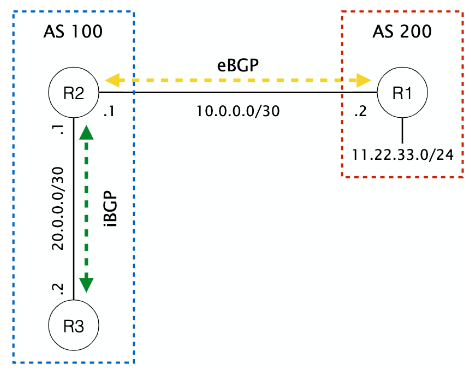
To add the next-hop-self command on FRR routers, you can use the following commands (on router R2):
router# conf t
router(config)# router bgp 100
router(config-router)# neighbor 20.0.0.2 remote-as 100
router(config-router)# neighbor 20.0.0.2 next-hop-self