Inter-Domain Routing
Now that you have achieved connectivity within you AS, the next step is to enable connectivity between the different ASes. Configure the external BGP sessions (eBGP) with your neighboring ASes (including the IXPs). You can see with which ASes you are directly connected to and with which IP subnet on the connections page of the mini-Internet website. You can negotiate with your neighboring ASes and agree on which IP addresses should be used by you and your peer.
Configure eBGP sessions
For every eBGP session, the mini-Internet website indicates the business relationship that rules this session, which router is connected to the neighboring AS, and what subnet you should use for that session.
If one of your routers is connected to a router that is an AS operated by the TA team, we explicitly indicate which IP address to use.
You can set some filters on the webpage to only see the BGP sessions that relate to your group. The screenshot below is an example of what the connections page tells us for group 6.
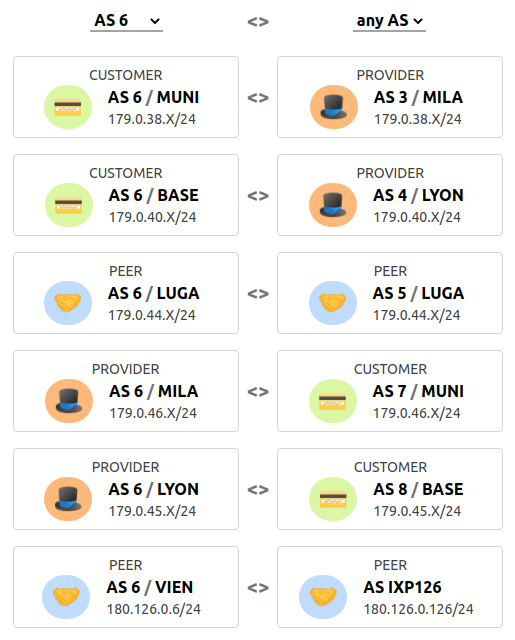
We see that AS 6 has two peers (AS5 and IXP126), two customer (AS7 and AS8), and two providers (AS3 and AS4). AS6 is connected to IXP126 via its router GUAM. In this case, you might configure the IP address 180.126.0.6/24 on the interface of GUAM conected to the IXP. In our mini-Internet, the AS number of an IXP is its identifier. For example, IXP126 has the S number 126. The IP address of the IXP router server is 180.Z.0.Z with Z being the AS number of the IXP. The router server of IXP126, for example, has the IP address 180.126.0.126.
By default, IXPS are configured not to relay BGP advertisements to their peers. Thus, it is normal if you do not see your prefixes advertised through the IXP.
Once the eBGP sessions are established, advertise your prefix to your peers. You must only advertise the /8 that has been assigned to you. In the mean time, your peers should advertise to you their /8 prefix, as well as the prefixes they have learned (since there are no BGP policies yet).
💡 For this excerciese you will have to use the next-hop-self command when you configure external BGP sessions.
Tutorial on how to configure BGP.
Configure BGP policies
Configure your local preferences as well as the exportation rules to implement the customer-provider and peer-peer business relationships with your neighbors. The connections you have through your IXP must be considered as peer-peer connections.
Keep in mind that the default behavior of the IXP route server is to not relay the BGP advertisements, thus for now the prefixes you advertise your will not be propagated to the other IXP’s participants. Yet, you can already configure the exportation rules for the eBGP session you have with your IXP.
💡 To configure the exportation rules, you can tag incoming routes using BGP communities to keep track of where the routes you have learned came from, and then math on the tag when exporting the routes. Verify using traceroute or with the looking glass that the paths used do respect the business relationships.
Tutorial on how to configure BGP policies.
Configure BGP communities
By default, the IXPs are configured to not relay your BGP advertisements to their other peers. To announce a prefix to another peer via an IXP, you must specify it using a BGP value. IXPs are configured to relay a BGP advertisement to a peer X if the advertisement includes a community value equal to N:X with N the IXP number. For example, if you are AS 7 and you want to advertise a prefix to AS 28 via IXP 121, you must add the community value 121:28 in your BGP advertisements.
You must use the community values to send BGP advertisements to the peers connected to you through an IXP. However, for business reasons, you do not just want to peer with every other AS at the IXP. You do want to peer through this IXP with ASes that are located in another region. You do not want to peer through this IXP with ASes that are located in the same region. To not peer through the IXP with ASes in the same region, you must (i) not advertise them any prefixes and (ii) deny any advertisements coming from them.
To check whether you properly configured (ii), the stub ASes will advertise their prefix to all the ASes connected to their IXP.